
FlexClip AI Review: Video Marketing Tool for Busy Entrepreneurs
How business owners create professional marketing videos in minutes without hiring a video team or learning complex software
Let me be real with you for a second. As a business owner, I avoided creating video content for years. Not because I didn't understand its value, but because every time I opened a video editor, I felt like I needed a degree in filmmaking just to figure out where to start. Sound familiar?

As an entrepreneur running multiple business ventures, I simply didn't have time to spend hours learning complex video editing software or the budget to hire a full video production team. But here's the thing: video marketing is no longer optional if you want to grow an online business. Social media algorithms prioritize video content, your email open rates increase when you include video, and your website conversions literally double when you add product demo videos.
In my case, I had to learn video editing the hard way... I taught myself Adobe Premiere Pro using Skillshare's tutorials back in 2023 (and it's still awesome today, by the way!).
But nowadays, there are so many AI platforms that do all the hard work for you, and have intuitive interfaces that make video editing so simple!
And that's where FlexClip comes in. I've been testing it for the past few weeks specifically for my business marketing needs, and it has changed how I approach video content entirely. This isn't some overhyped tool that promises the world and delivers mediocrity.
It feels like a hub of AI creation tools, both for images and video, but with so much more. It's features are impressive. FlexClip is legitimately powerful, surprisingly intuitive, and packed with AI features that do the heavy lifting so you can focus on running your business.
In this review, I'm going to walk you through everything FlexClip offers from a business owner's perspective, show you exactly how the AI tools work for marketing content, and help you decide if it's the right video marketing solution for your company.
What is FlexClip? (And Who Is It Actually For?)
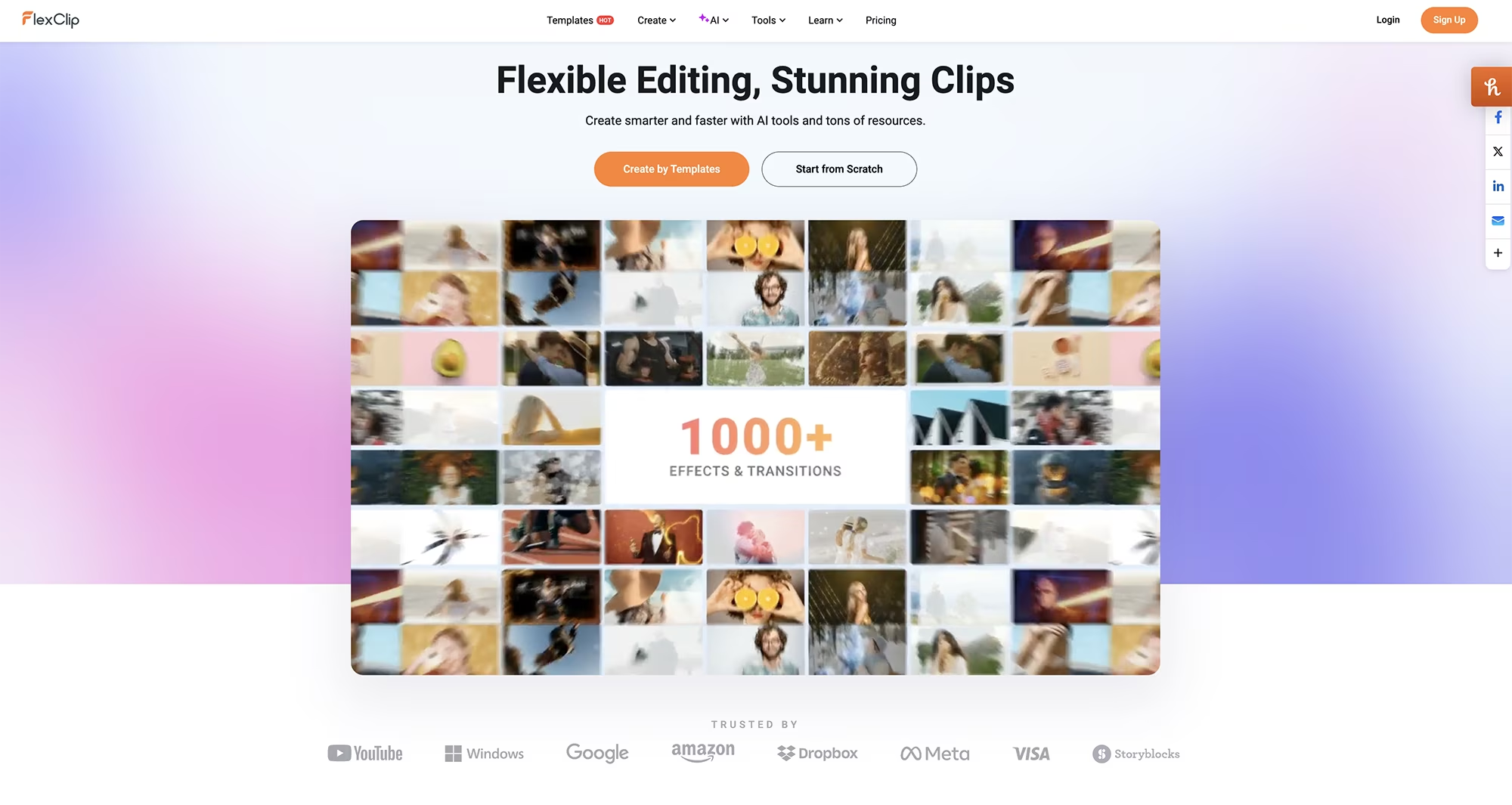
FlexClip is an online video creation platform that uses AI to simplify the entire video production process. Think of it as having a professional video editor, scriptwriter, and graphic designer all rolled into one tool that you can access from any web browser.
No downloads. No complicated installation process. You just log in and start creating.
Here's who FlexClip is perfect for:
Business owners and entrepreneurs who need marketing videos, but don't have a video team or massive production budget.
Whether you're creating product demos, promotional content, social media ads, or customer testimonials, FlexClip gives you the tools to compete with bigger brands without the overhead costs.Marketing teams at growing companies who need to produce video content at scale.
If you're responsible for creating consistent video content across multiple channels, but don't have dedicated video editors, FlexClip streamlines your workflow significantly.Content creators and social media managers who need to pump out videos quickly without sacrificing quality.
If you're running business social accounts or creating content for clients, FlexClip lets you create professional-looking videos in a fraction of the time that traditional editing would take.E-commerce business owners who need product videos for listings, ads, and social media.
Amazon sellers, Etsy shop owners, Shopify store managers, and online retailers can create scroll-stopping product videos without hiring a videographer for every SKU.Corporate trainers and HR professionals who need to produce internal training videos, onboarding content, and company announcements.
FlexClip makes it easy to create polished, professional videos for internal communications without burdening your IT department.Coaches, consultants, and service providers who need video content for courses, client presentations, and marketing funnels.
If your business relies on demonstrating expertise through video, FlexClip removes the technical barriers.
FlexClip's Key Features: What Actually Matters
Let's cut through the marketing fluff and talk about what FlexClip actually does and why it matters for your business.
As I mentioned before, FlexClip feels like a hub of powerful AI tools for image and video creation, and I am impressed with how many AI models, settings and features it offers in one place.
No need for multiple subscriptions to multiple AI tools! You have it all here!
AI Video Generator (Text-to-Video Magic)
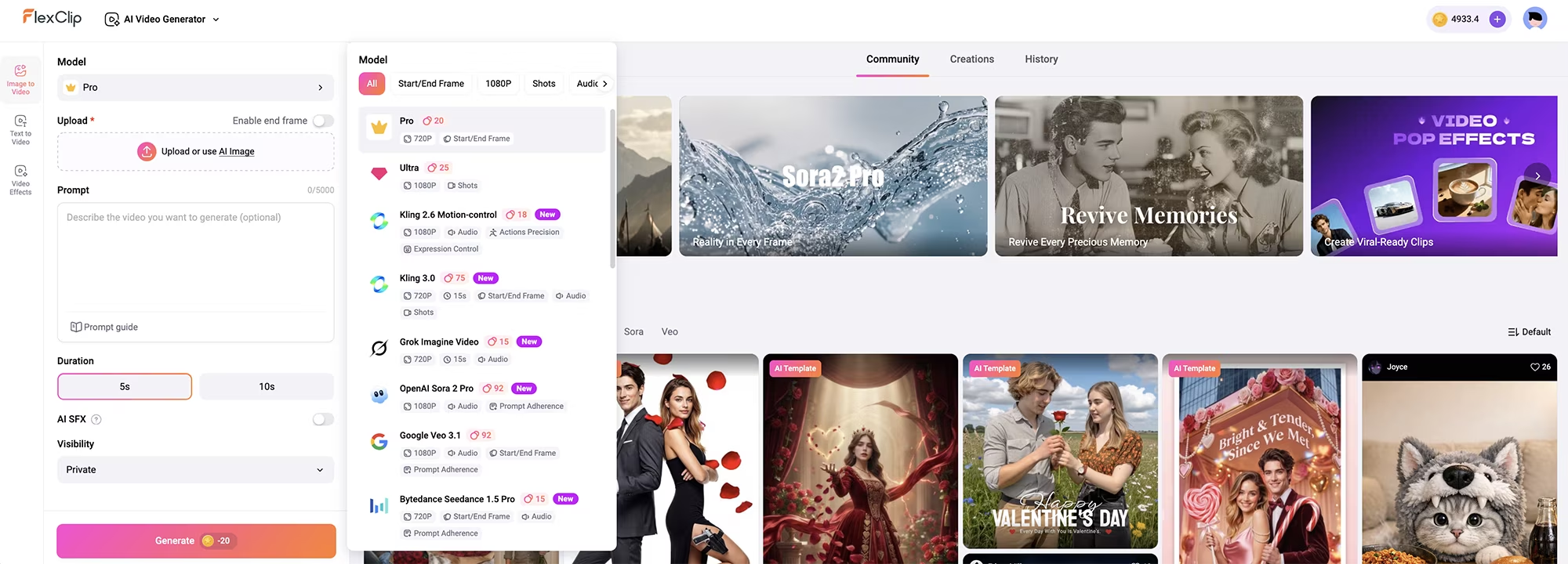
This is the feature that initially sold me on FlexClip. You literally type in what you want your video to be about, and the AI generates a complete video with relevant footage, transitions, and music.
Here's how it works in practice:
You enter a prompt describing your video concept. For example, I typed: "Create a 60-second promotional video for a digital design template shop that helps entrepreneurs create professional marketing materials without design experience."
You can choose from different types of AI Models, and I love that it doesn't use many credits for video generation!
Some video models allow you to use an image as reference, which allows consistent character creation. You can also generate that base image in FlexClip first!
You can create short videos of 5 or 10 seconds, or full long form videos too.
FlexClip's AI analyzes your prompt and generates a complete video script broken into scenes. It considers pacing, storytelling structure, and calls-to-action.
The platform then matches each scene with relevant stock footage or images from its library of over 4 million assets. The AI actually understands context, so it's not just throwing random clips together. You can also completely generate each scene using ai instead of using stock.
It adds smooth transitions, background music that fits the mood, subtitles, and it even suggests text overlays for key messages.
The entire process takes about 2-3 minutes from prompt to finished first draft.
Now, is the first draft perfect? No. But it's 80% to 90% there, and you can customize everything the AI generates. The real power is that instead of staring at a blank timeline wondering where to start, you have a solid foundation to build on.
AI Script Generator (Overcome Writer's Block)
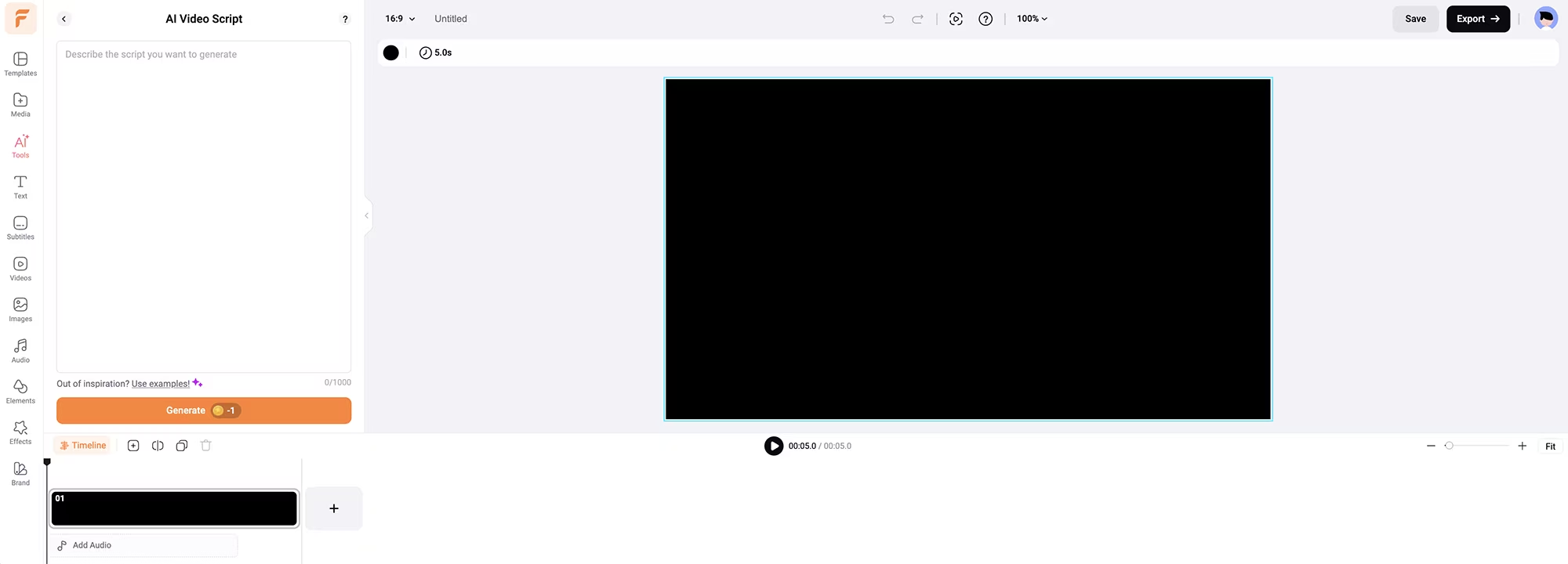
Sometimes you have a clear vision for your video but struggle with the script. That's where FlexClip's AI script generator can help.
You tell it what your video is about, what action you want viewers to take, and how long the video should be. The AI writes a complete script formatted into scenes with suggested visuals.
What I love about this feature is that it doesn't just generate generic copy. The scripts actually sound conversational and natural, not like they were written by a robot. You can specify the tone (professional, casual, enthusiastic, educational) and the AI adjusts its writing style accordingly.
For content creators who batch-create videos, this is a massive time-saver. Instead of spending an hour crafting each script, you can generate different script variations in minutes and choose the best one.
AI Image Generation Tools (Create Custom Visuals)
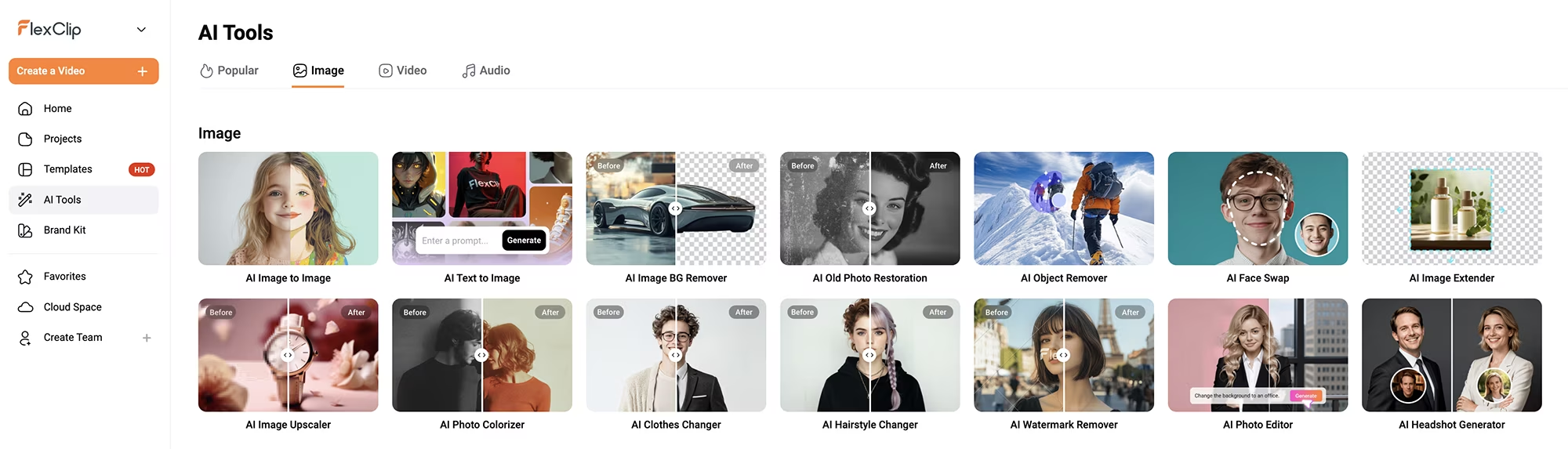
This is where FlexClip really stands out from competitors. The platform includes multiple AI image generation options that integrate seamlessly into your video workflow. This eliminates the need for a Midjourney subscription, a Canva subscription, or any other image generation tool.
Text-to-Image Generation
Need a custom visual that doesn't exist in stock libraries? Just describe it in text, and FlexClip's AI generates it for you. I used this to create unique background images for my template promotion videos.
For example, I typed "modern minimalist home office with plants, natural light, and a woman working on a laptop, warm color palette" and got exactly what I needed. The quality is impressive, and the images look professional enough to use in client-facing content.
Image-to-Image Transformation
This feature lets you upload a reference image and have the AI generate variations or apply different styles. It's perfect for maintaining visual consistency across a video series while creating fresh content.
I uploaded a real life photo of myself, and asked the AI to create a realistic ai image of myself in a different setting (see the main photo for this blog post? I created it with FlexClip!). Within seconds, I had an image of myself making a surprised face, sitting in a modern office.
You can also create cartoon versions, watercolor versions, and sketch versions. This opens up creative possibilities that would normally require hiring an illustrator.
AI Image Enhancement
Got blurry product photos or low-quality screenshots? FlexClip's AI can upscale and enhance images automatically. This is a game-changer for graphic designers, business owners, and e-commerce sellers who need to work with images from suppliers that aren't always high resolution (they usually aren't!).
I like using Topaz Lab's Gigapixel for this, and had to pay for that tool (don't get me wrong, it is excellent). But now, with FlexClip, I don't need an extra tool for image enhancement and upscaling!
AI Auto Subtitle Generator (Accessibility Matters)
Here's a stat that should matter to every content creator: 85% of videos on social media are watched without sound. If your videos don't have captions, you're losing most of your audience.
FlexClip's auto subtitle feature uses AI speech recognition to transcribe your audio, and automatically add timed captions. The accuracy is surprisingly good, usually around 95% without any manual corrections.
What I appreciate is the customization options available. FlexClip provides professionally designed subtitle style templates that you can then customize to match your brand - adjusting the font, size, text color, background color, position, alignment, and opacity.
While you select from preset animation styles rather than building animations from scratch, there are plenty of options to create captions that fit your brand aesthetic and you can apply these styles consistently across all your videos.
The feature also supports multiple languages, which is crucial if you're reaching international audiences. I tested it with Spanish audio, and the transcription was just as accurate as English.
AI Text-to-Speech (Create Voiceovers Without Recording)
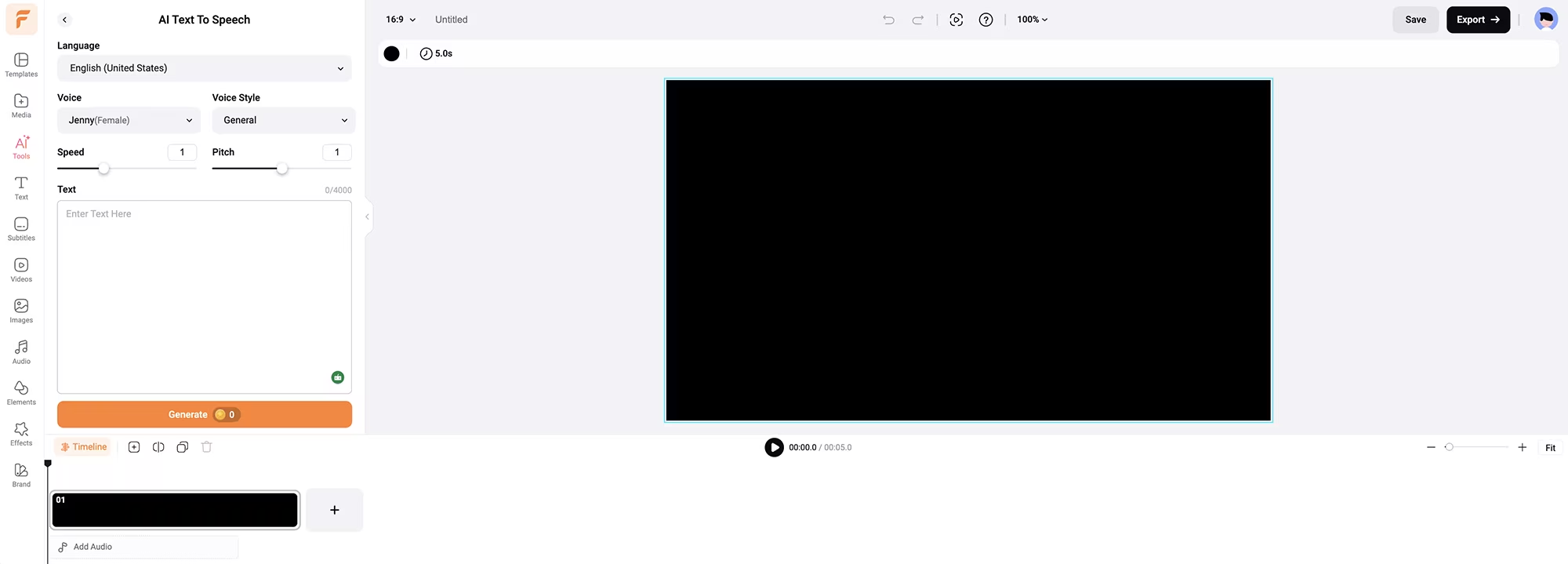
Not comfortable recording your own voice? Camera shy? Bad microphone? FlexClip's text-to-speech AI solves all of these problems.
You paste in your script, choose from several AI voices (male, female, different accents and languages), and the platform generates a natural-sounding voiceover. The voice quality has improved dramatically, these don't sound robotic like older text-to-speech technology.
I've used this for explainer videos and tutorial content where I didn't want to record audio. The voices have natural inflection and pacing, and you can adjust the speed and pitch to fine-tune the delivery.
AI Background Removal (Green Screen Without the Green Screen)
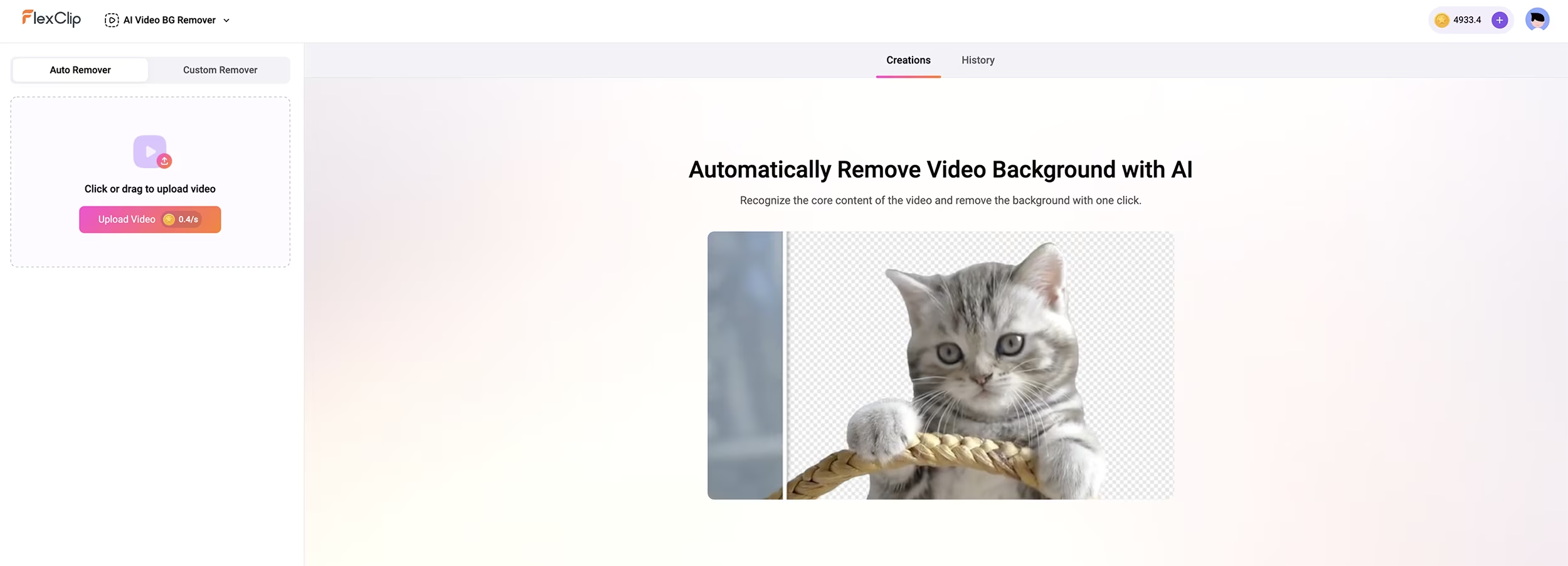
Need to remove backgrounds from videos or images? FlexClip's AI does it automatically with impressive accuracy. Click a button, wait a few seconds, and the background is gone.
This is incredibly useful for product videos. Shoot your product on any surface, remove the background, and place it on a clean studio backdrop or dynamic background. No expensive photography setup required. No additional Canva subscription needed either.
The edge detection is clean, even with complex subjects like hair or transparent objects. I've tested it with everything from product shots to talking-head videos, and it consistently delivers professional results.
Massive Stock Library (4 Million+ Assets)
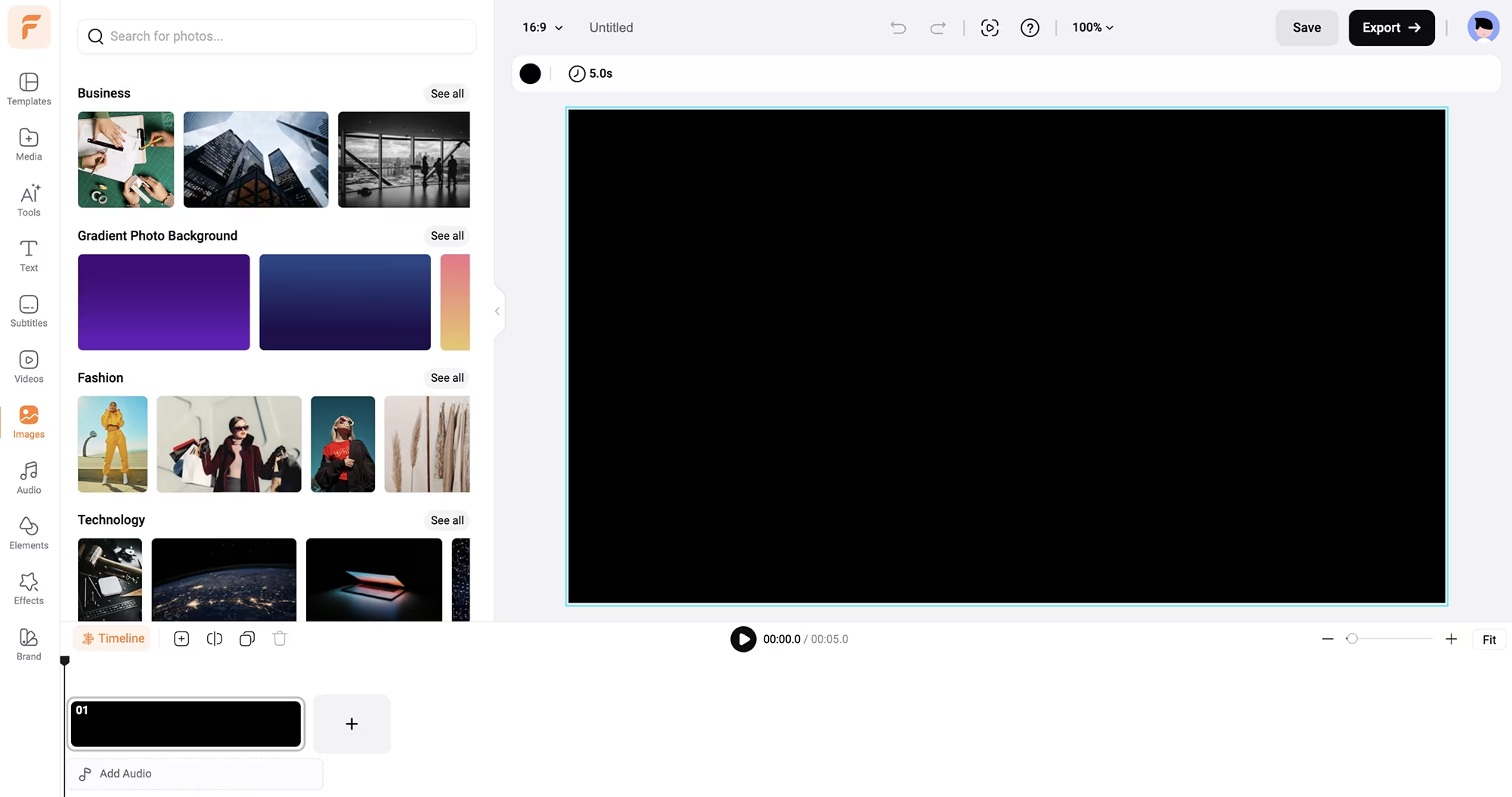
FlexClip includes access to over 4 million royalty-free stock videos and photos, plus more than 74,000 music tracks and sound effects. This alone can save you hundreds of dollars per month in stock footage and music subscriptions.
The library quality is high. These aren't low-resolution clips or cheesy stock photos. The content is modern, diverse, and professional-grade. The search function is smart too; it understands context and shows relevant results based on keywords.
The music library deserves special mention. Finding the right background music can make or break a video, and FlexClip offers over 74,000 tracks and sound effects across every genre. Each track is tagged by mood, tempo, and style, making it easy to find exactly what you need.
Important note for monetized content: While FlexClip's music is royalty-free for most uses, if you're creating monetized YouTube content or commercial advertising, verify the specific licensing terms for each track you use. Some business owners use separate music licensing services like Epidemic Sound (which I highly recommend) or Artlist for monetized content to avoid any potential issues.
Core Video Editing Features (The Fundamentals Done Right)
Beyond the AI tools, FlexClip includes all the standard video editing features you'd expect, but they're implemented in a way that's actually intuitive.
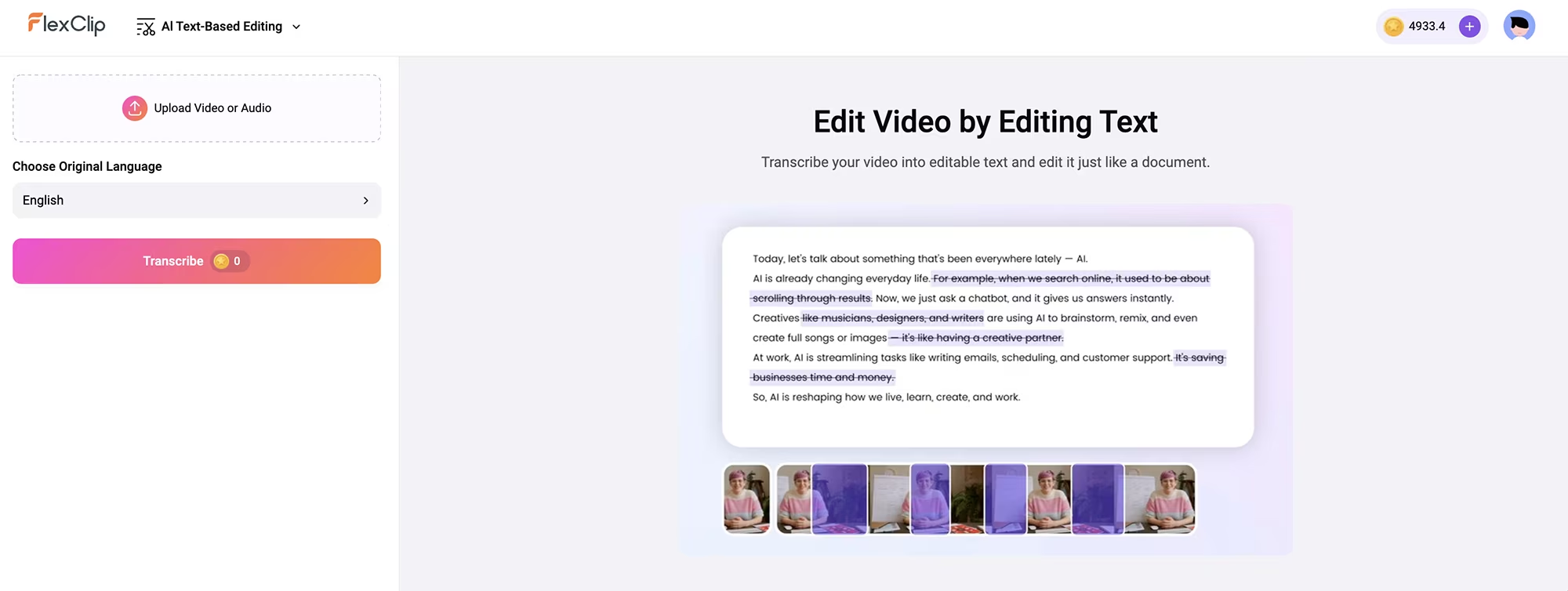
Text-Based Video Editing: One of FlexClip's standout features is text-based editing, which changes the game for business owners who work with interview content, talking-head videos, or any footage with dialogue. Instead of scrubbing through timelines looking for specific moments, you can edit your video by editing the transcript. Delete a word from the transcript, and FlexClip removes that section from your video automatically. This makes cutting filler words, removing mistakes, or trimming long interviews incredibly fast. For entrepreneurs creating testimonial videos, podcast clips, or educational content, this feature alone can save hours per project.
Video Trimming and Splitting: Cut out unwanted sections with precision. The timeline is easy to navigate, and you can zoom in for frame-accurate edits. The split button lets you divide clips into segments, making it simple to rearrange or remove specific parts.
Speed Controls: Create slow-motion or time-lapse effects with normal speed adjustments (0.2x to 8x) or use curve speed for advanced control (0.1x to 8x). This is perfect for product reveals, demonstrating processes, or adding dramatic emphasis to key moments.
Transitions: Over 200 professional transitions that don't look cheesy. Smooth fades, dynamic wipes, dissolves, and creative effects that add polish without being distracting. These help your videos flow naturally from scene to scene.
Text and Graphics: Add animated text, shapes, and graphics with ease. The text animation presets are particularly well-done—they add movement and visual interest without being over-the-top or distracting from your message.
Filters and Effects: Color grading presets, vintage effects, overlays, and more. Adjust brightness, contrast, saturation, vignette, shadows, and tint to give your videos a consistent, professional look that matches your brand.
Picture-in-Picture: Layer unlimited videos and images for tutorials, reactions, comparison content, or showcasing multiple products simultaneously. Perfect for creating engaging educational content or reaction videos.
Chroma Key (Green Screen): Professional background replacement without expensive equipment. Shoot against any green background and swap it with custom backgrounds, stock footage, or AI-generated scenes. Great for creating professional-looking videos from home offices or budget setups.
Freeze Frame: Pause your video on a specific moment to add text, graphics, or emphasis. Useful for highlighting important information or creating thumbnail-worthy moments.
Reverse Video: Play footage backwards for creative effects or revealing transformations. Simple but effective for before-and-after content or artistic sequences.
Video Collage: Display multiple videos simultaneously in split-screen layouts. Perfect for comparison videos, showcasing product variations, or creating dynamic social media content.
Motion Tracking: This recently added feature automatically tracks moving objects in your video and keeps text or graphics attached to them. Ideal for product showcases, action content, or adding dynamic branding that follows specific elements in your footage.
Screen Recording: Built-in screen capture for creating software tutorials, recording presentations, or demonstrating digital products. No need for separate screen recording software.
Webcam Recording: Record yourself talking to camera directly in the platform. Perfect for personal messages, talking-head intros, or video testimonials.
FlexClip's Learn Section (Master the Platform Fast)
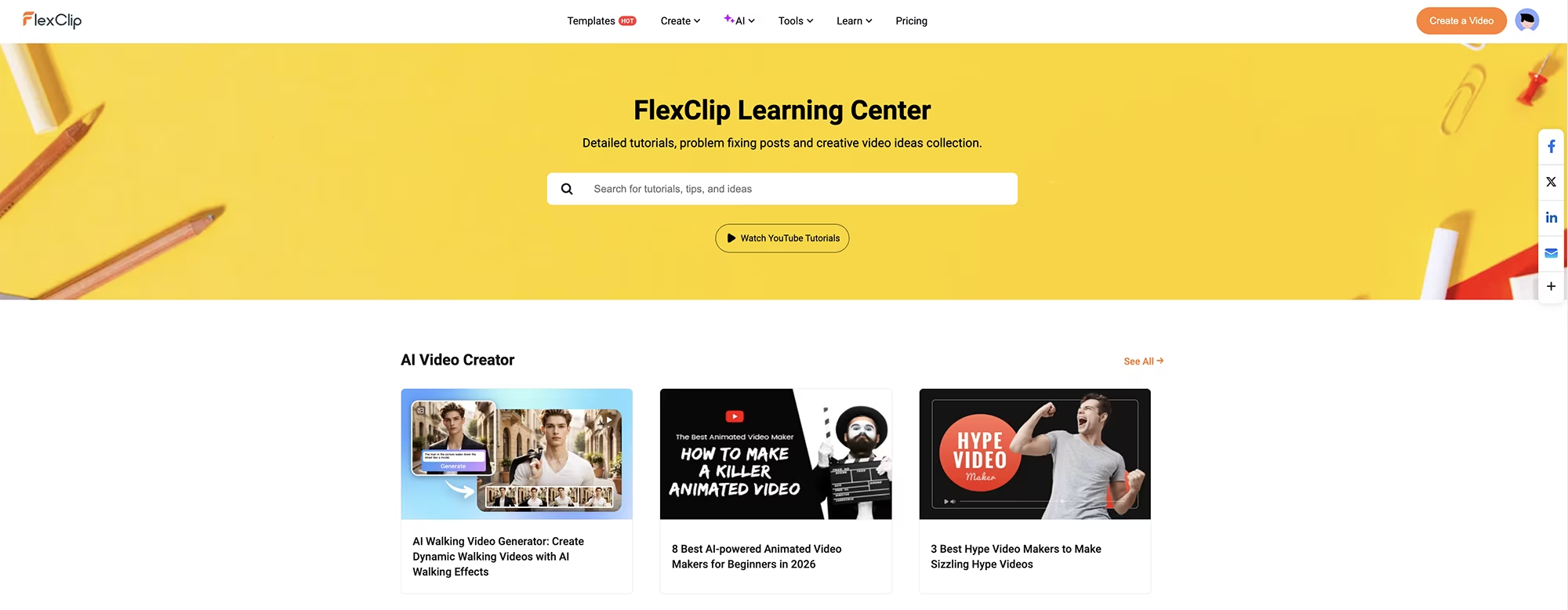
One of the most underrated aspects of FlexClip is its comprehensive Learn section. This is where FlexClip really shines compared to competitors that leave you to figure everything out on your own.
The Learn section includes:
Step-by-step video tutorials covering every feature, from basic editing to advanced AI tools. These aren't boring 20-minute rambling tutorials, they're concise and actionable.
Written guides with screenshots that walk you through specific tasks. Want to learn how to add custom fonts? There's a guide. Need to understand aspect ratios for different platforms? There's a guide.
Best practices for different video types. Learn the optimal length, pacing, and structure for YouTube videos vs Instagram Reels vs TikTok content.
Tips for maximizing AI features. The Learn section teaches you how to write better prompts for the AI generators to get exactly the results you want.
Creative inspiration and use case examples. See how other creators are using FlexClip for different business applications.
I recommend spending 30 minutes in the Learn section when you first start using FlexClip. You'll discover features and shortcuts that will save you hours down the road. The platform is intuitive enough to start using immediately, but the Learn section helps you use it at its maximum potential.
Real-World Business Use Cases: How Entrepreneurs Actually Use FlexClip

Theory is great, but let me show you exactly how I and other business owners use FlexClip for actual marketing and business needs.
Social Media Marketing Content
I create short-form videos for Youtube, Instagram Reels, TikTok, and LinkedIn to promote my client's business offerings and build brand awareness.
Using FlexClip's AI video generator, I can produce a week's worth of content in a few minutes or hours. I give the AI a marketing message or product benefit, it generates the video structure, and I customize the final 20% with their branding. This consistency has directly increased their social media engagement and lead generation.
Product Demo and Explainer Videos
For digital products and services, I create quick demo videos showing how they work and the value they provide. I screen record the product in action, add auto-generated subtitles for accessibility, overlay text highlighting key features and benefits, and add a professional intro with a clear call-to-action. Total time: 15-60 minutes per product video. These videos have increased conversion rates on landing pages significantly.
Email Marketing Video Campaigns
Adding short videos to promotional emails can dramatically increase click-through rates. I use FlexClip to create 5-15 second teaser videos for product launches, announcements, and special offers. The AI text-to-speech feature lets me add voiceovers without recording audio, which is perfect for batch-creating multiple email campaigns quickly.
Sales Presentations and Pitch Decks
Instead of static PowerPoint presentations, I create video presentations for client pitches and sales meetings. FlexClip's templates make it easy to create professional-looking presentation videos that stand out. I've closed deals specifically because prospects commented on how polished and engaging my video presentations were compared to competitors.
Website Homepage and Landing Page Videos
Homepage videos explaining what your business does are a huge asset. I've created explainer videos for my client's main websites using FlexClip's AI script generator and stock footage library. Website visitors who watch the video are 3x more likely to convert into leads than those who don't.
Internal Team Communication and Training
For businesses with remote teams or multiple locations, video communication is essential. I use FlexClip to create training videos for my client's new team members, process documentation videos, and company update announcements. The screen recording feature combined with AI subtitles makes it easy to create clear, professional internal videos that can be referenced repeatedly.
Paid Advertising Creative
Video ads on Facebook, Instagram, and YouTube significantly outperform static image ads. I've created multiple ad variations using FlexClip's templates, test them against each other, and scale the winners. The ability to quickly produce 5-10 different ad variations in an afternoon is a game-changer for advertising ROI.
Client Work and Agency Services
If you offer marketing or creative services to other businesses, FlexClip becomes a profit center. I can charge clients premium rates for video content while keeping production costs low. The time savings mean I can take on more client projects without hiring additional staff, directly increasing my business margins.
How FlexClip Compares to Other Video Tools

You're probably wondering how FlexClip stacks up against other popular video creation tools. Let me give you my honest take based on actually using these platforms.
FlexClip vs. Canva Video
If you love Canva, you might be tempted to use its video features. Canva is fantastic for static design, but its video editing capabilities are limited. FlexClip is purpose-built for video and it shows. FlexClip's timeline editing is more robust, the stock library is larger and higher quality, and the AI video generation is far more advanced. That said, if you're already deep in the Canva ecosystem and only need basic video edits, Canva might be sufficient.
FlexClip vs. CapCut
CapCut is popular among TikTok creators and it's free, which is its biggest advantage. However, CapCut is mobile-first and feels cramped on desktop. FlexClip offers a better desktop experience with more professional features. CapCut is great for quick social media edits, but FlexClip is better for business-focused content where quality matters.
FlexClip vs. Adobe Premiere Pro
Adobe Premiere is industry-standard professional software with unlimited capabilities, and yes, I do love it. But it's also expensive, has a steep learning curve, and is overkill for 90% of business video needs. FlexClip won't replace Premiere for a professional video editor, but for entrepreneurs and content creators, FlexClip delivers 80% of the results with 10% of the complexity.
FlexClip vs. Descript
Descript excels at podcast editing and transcript-based video editing. If that's your primary use case, Descript might be better. But, for general video creation with AI features, FlexClip is more versatile, the AI credits last longer, and it has a larger stock library. I love using Descript, but when it comes to AI-generated content and AI models available, FlexClip is definitely the winner.
FlexClip Pricing: Is It Worth the Investment?
FlexClip offers several pricing tiers, and choosing the right one depends on your usage level and business needs.
FlexClip has a free plan that's actually usable, unlike many "free" tools that severely limit functionality. You can create videos up to 10 minutes long with standard definition export. There's a FlexClip watermark, but you can test all the features before committing to a paid plan.
The paid plans unlock longer video exports, HD and 4K quality, watermark removal, and higher usage limits for AI features. For most content creators and small businesses, the Plus plan offers the best value. You get everything you need without paying for enterprise features you won't use.
Here's how I think about the value from a business perspective:
If you were to hire a freelance video editor at even modest rates ($50-100/hour) instead of using FlexClip: producing just 5 marketing videos per month would cost you $500-1000. Add in stock footage subscriptions ($30-50/month), AI script tools ($20-40/month), and image generation tools ($10-30/month), and you're easily spending $600-1100 monthly on video production.
FlexClip bundles all of this into one platform at a super small fraction of the cost. For businesses where video is a key part of your marketing strategy, FlexClip pays for itself if it saves you just 2-3 hours per month. At most business owners' effective hourly rates, the ROI is obvious.
Beyond the direct cost savings, consider the opportunity cost. Every hour you spend wrestling with complicated video software or waiting on freelancer revisions, is an hour you're not spending on revenue-generating activities. FlexClip's speed and ease of use, plus its affordable cost, have a compounding effect on business productivity.
Should Your Business Use FlexClip? My Honest Recommendation

You need to create professional marketing videos quickly without hiring a video team or learning complex software. FlexClip removes the technical barriers that stop most businesses from creating video content consistently.
Video marketing is central to your business growth strategy but you don't have the budget for full-time video staff. The ability to produce consistent, on-brand video content at a fraction of traditional costs gives small businesses the ability to compete with larger competitors.
You want AI to handle the heavy lifting while maintaining creative control over your brand messaging. FlexClip strikes the right balance between automation and customization, letting you work faster without sacrificing quality or brand consistency.
You value speed and efficiency over having every possible advanced feature. FlexClip is about getting quality marketing results fast, not spending hours perfecting every frame. For most business applications, this is exactly what you need.
You're a solopreneur, small business, or growing company that needs to produce video content at scale. FlexClip makes it possible for one person to do the work that would normally require a small production team.
Your business uses video across multiple channels including social media, email, website, ads, and sales. FlexClip's ability to quickly resize and reformat content for different platforms saves massive amounts of time.
FlexClip might not be right for your business if:
You have dedicated professional video editors on staff who need frame-perfect control and advanced color grading for cinematic productions. They should stick with Adobe Premiere or DaVinci Resolve.
You only create one or two videos per year. The free plan might suffice for occasional use, but a paid subscription probably isn't justified for very low-volume needs.
You need offline editing capabilities for locations without reliable internet access. FlexClip requires internet connectivity to function.
Your business produces long-form documentary content or complex multi-layer productions that require advanced editing capabilities beyond what FlexClip offers.
Final Thoughts: FlexClip is Changing How I Market My Business (& my Clients Businesses!)
Here's what it comes down to: FlexClip removed video creation as a bottleneck in my business growth, and has allowed me to cut down on other AI tool subscriptions, which were eating my profits.
Before FlexClip, I avoided most video marketing projects because they felt overwhelming and time-consuming. The setup, the editing, the rendering, the technical complexity. It all seemed like too much work for the return. I knew video was important, but I kept putting it off.
Now, I create marketing videos as easily as I create graphics or write email copy. Video is no longer a special project that requires planning and outsourcing. It's just another tool in my marketing toolkit that I can deploy whenever I need it.
The AI features aren't just gimmicks or marketing hype. They genuinely save time and produce quality results that work for business purposes.
The text-to-video generator gives me starting points instead of blank timelines. The script generator overcomes writer's block when I need to explain complex products or services. The image generation tools create custom visuals without stock photo licensing headaches or expensive photoshoots.
Most importantly for business owners, FlexClip helps you show up consistently. I can maintain a regular video marketing schedule for my clients across several platforms, because video creation is no longer a multiple-day-long (or weeks!) project that derails my entire work schedule. That consistency has directly impacted my business growth, lead generation, and customer engagement. And I'm just getting started with this tool!
The ROI is clear. The time I save on video production gets reinvested into revenue-generating activities. The professional quality of the output means my business competes effectively with larger competitors who have dedicated video teams. And the cost savings compared to hiring freelancers or agencies means more marketing budget available for distribution and paid promotion.
If video marketing feels intimidating or too expensive for your business, FlexClip is worth trying. Start with the free plan to test the features and see if it fits your workflow. For most entrepreneurs, small business owners, and growing companies, I think you'll find it becomes an essential part of your marketing infrastructure.
Ready to Transform Your Business Video Marketing?
If you're ready to start creating professional marketing videos without an expensinve price tag or learning curve, give FlexClip a try.
You can start with their free plan to test all the features, and see if it works for your business needs.
Get Started with FlexClip for FREE!
CLICK HERE to try FlexClip today, and see how AI-powered image & video creation can transform your marketing strategy.
The platform offers a free trial with no credit card required, so there's zero risk in testing it out. Create your first marketing video today and experience how much faster and more cost-effective video production becomes when you have the right tools.
Need Help Creating AI-Powered Video Content for Your Business?
While FlexClip makes video creation accessible to everyone, I understand that many business owners simply don't have the time to create their own marketing videos, even with AI tools. Between running operations, managing teams, and serving clients, adding "video creator" to your list of responsibilities isn't always realistic.
That's where Desiggn Studio comes in. If you'd rather have a professional handle your AI content creation so you can focus on what you do best, I offer comprehensive digital marketing services that leverage the latest AI tools to create high-impact visual content for your business.
My AI-Powered Content Creation Services Include:
Marketing Video Production - I'll create professional product demos, social media videos, explainer videos, and promotional content using FlexClip and other advanced AI tools so your business stands out across all platforms.
AI Image Generation & Design - Custom AI-generated images, graphics, and visual assets tailored to your brand, perfect for social media posts, website content, and marketing campaigns.
Social Media Content Management - Complete social media strategy and content creation including video posts, graphics, captions, and scheduling across your entire online presence.
Website Design & Optimization - Professional website design that showcases your brand and converts visitors into customers, optimized for both desktop and mobile.
Complete Brand Identity Systems - From logo design to comprehensive brand guidelines that ensure consistency across all your marketing materials, both digital and print.
Printed Promotional Materials - Business cards, brochures, flyers, and other physical marketing materials that complement your digital presence.
Desiggn Studio delivers results that drive real business growth.
I combine traditional design principles with cutting-edge AI technology to create content that captures attention and converts.
Schedule your free consultation today to discover how professional AI-powered design and video content can accelerate your business success without adding to your workload.

Written by
This article was created by Desiggn Studio and sponsored by FlexClip who provided access to its tools. Thank you so much to FlexClip for reaching out!
Interested in contributing to this blog with an article and a mention of your company?
Latest Blog Posts
Want Pro Tips + Special Offers?
Get valuable insights for your business and be notified about seasonal promotions!
© 2025 Desiggn Studio • A GG Solutions Company. All rights reserved.
Privacy Policy + Terms and Conditions
Created with Systeme.io